

An accessibility expert coded their own contrast checker
Artificial intelligence has made the development of software and various tools more accessible. It is now possible to move from an idea to a first version much more quickly than before, and a strong background in coding is no longer always an absolute prerequisite.
At the same time, a phenomenon has emerged that is often referred to as ‘vibe coding’. The term is used particularly in situations where non-coders build solutions largely relying on artificial intelligence. This opens up new opportunities for specialist work, but also brings with it new challenges in terms of quality and maintainability.
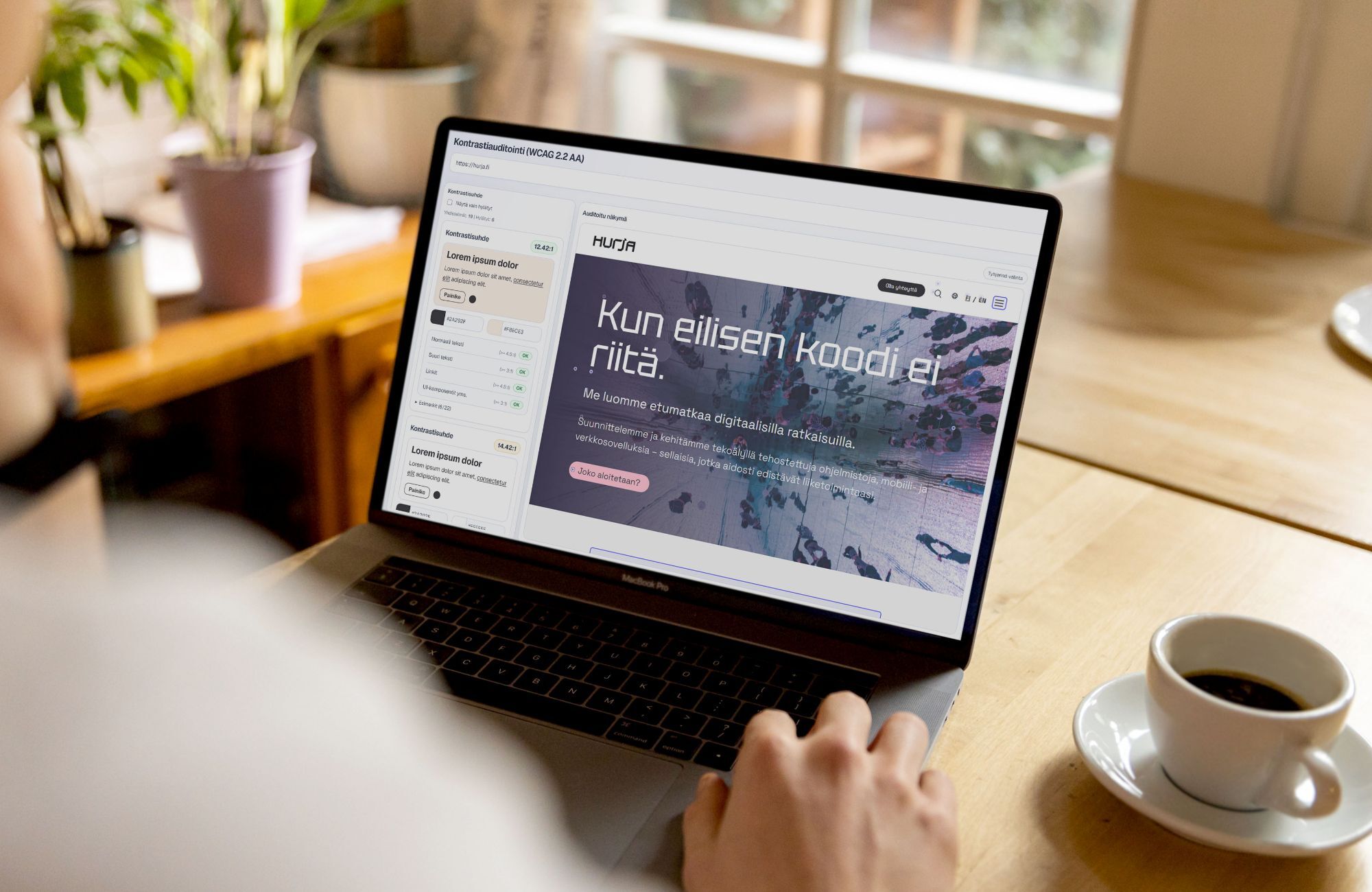
Our UX/UI designer and accessibility specialist, Hanna, put this into practice. She has a background in front-end technologies and graphic design, but actual application development is not her core expertise. Nevertheless, using Codex, she coded an internal tool that streamlines the checking of color contrasts in Hurja’s accessibility audits.
In this article, we explain why the tool was created, how it was developed and how it supports practical auditing work.
- Checking color contrasts required manual work during accessibility audits
- The solution was built using Vibe Coding
- How does the tool work?
- What has actually changed as a result of the accessibility audit?
- Expertise guides, artificial intelligence accelerates
- Artificial intelligence to support practical work
Checking color contrasts required manual work during accessibility audits
An accessibility audit assesses how well a digital service meets the WCAG 2.2 criteria, i.e. the international accessibility guidelines. One key set of criteria at Level AA concerns color contrast: text, buttons, icons and links must stand out clearly enough against their background so that they are readable even for users with impaired vision. Level AA, to which many organizations are obliged under the Digital Services Act, sets precise ratios for the minimum level of contrast required.
Checking color contrast sounds simple: you compare two colors, check whether the requirement is met, and record the result in a report. In practice, however, the process involves a long series of manual steps.
First, the colors to be compared must be reliably identified. Sometimes they can be found in the source code or CSS; sometimes the color must be sampled from the user interface using a color picker; and sometimes it is determined via a screenshot in Photoshop. Only then are the HEX color codes entered into a separate contrast checker and the results transferred to the audit report.
The tools available often only help with part of this process. Automated plugins identify problems, but they do not always understand the context or allow you to choose which elements to check. This is particularly evident with buttons, where there are two key contrasts: the text in relation to the button color, and the button in relation to the background.
The end result was that what was technically a straightforward check turned out to be a frustratingly slow stage of the audit, involving jumping from one tool to another.
The solution was built using Vibe Coding
Hanna decided to build an in-house tool that would better reflect the actual workflow of an accessibility audit. Although she has a background in front-end technologies, building her own tool from scratch was a new challenge. Artificial intelligence provided her with a new tool and a practical way to move forward.
In the early stages of design, Hanna sketched out a simple wireframe in Figma, which was used as context for the AI: a description of what the view and reporting should actually look like. The tool was then built iteratively using Codex, through specification, testing and rapid experimentation. Development proceeded using the logic of vibe coding, but the direction was guided throughout by a deep understanding of the day-to-day reality of accessibility auditing.
How does the tool work?
The finished tool combines two verification methods in one tool.
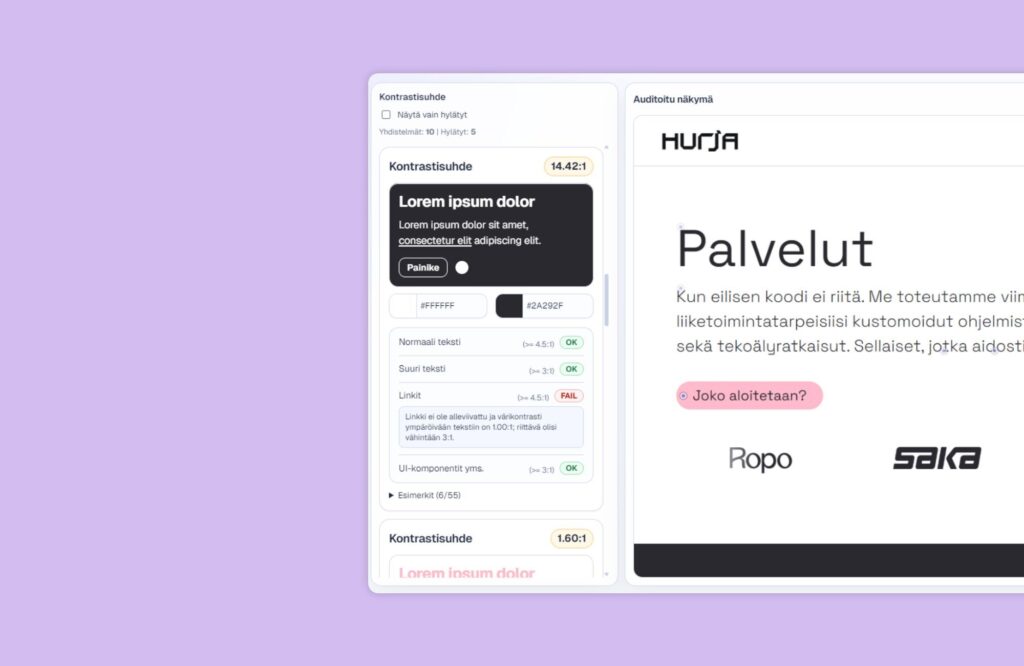
Automatic page scanning is based on Playwright. It opens the page to be audited programmatically, scans the view and collects the elements to be checked. The findings are listed so that you can see at a glance which items meet the WCAG 2.2 AA level requirements and which require attention. For failed items, the reasons and suggested fixes are displayed directly for reporting purposes.
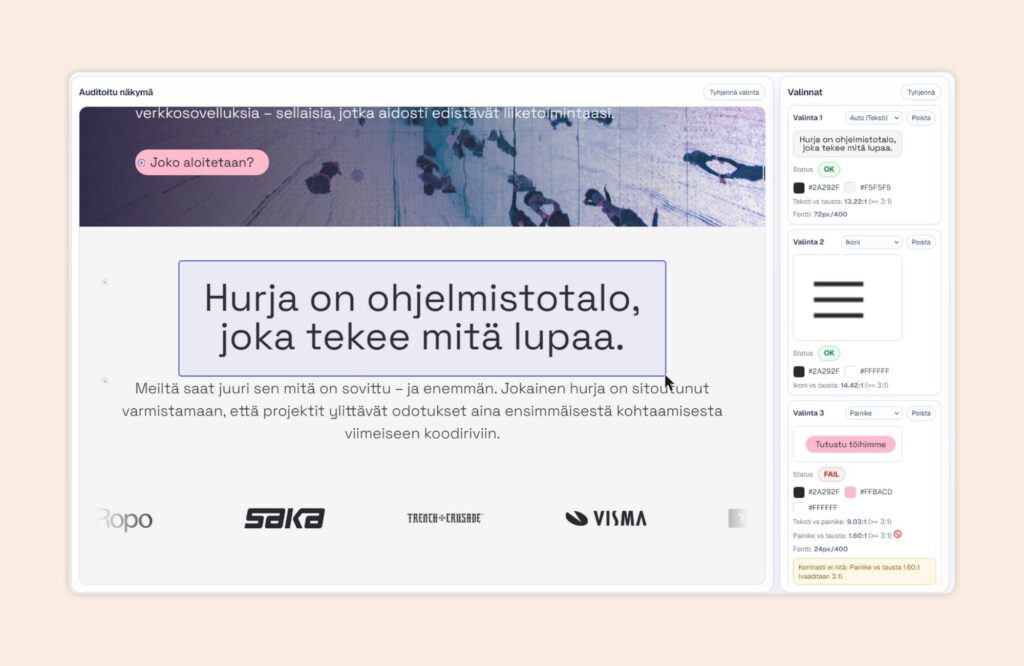
The cropping tool, which uses a screenshot, complements the automatic scanning process. The user can select the desired area with the mouse, and the tool compares the colors extracted from within the selected area. The finding is automatically classified as, for example, text, a button, an icon or a link, so that the contrast ratio can be interpreted correctly. The screenshot, category, colors and contrast ratio are displayed in the same view, and the hex codes can be copied to the clipboard at the click of a button.
What has actually changed as a result of the accessibility audit?
Several separate work stages have been consolidated into a single, clear workflow. Automatic scanning provides an overview quickly, and any unclear cases can be checked by zooming in within the same view without any extra steps. As the findings already display HEX color codes, rationales and suggested corrections, transferring them to the audit report is straightforward.
As a result, the audit process is accelerated, but at the same time it becomes more precise, as the context is better managed throughout the process.
Expertise guides, artificial intelligence accelerates
This project is a great example of what vibe coding is all about at its best. The tool was created based on a well-defined problem and a clear vision, and was developed iteratively to suit its intended purpose. Artificial intelligence helped with the implementation, but the decisive factor was expertise: an understanding of how the audit process works and where manual work should be reduced.
We have previously written in more detail about what “vibe coding” means from the perspective of software architecture, and when a rapidly developed application needs to be complemented by a structured approach.
Artificial intelligence to support practical work
Hanna’s contrast checker is a concrete example of how we at Hurja are using artificial intelligence to develop our own working methods. In this case, the tool emerged directly from the day-to-day work of accessibility auditing: the need to bring together, in a more streamlined way, the information required for contrast checking, cropping and reporting in one place.
The tool speeds up the process of checking for accessibility issues and makes the audit process run more smoothly. In an accessibility audit, tools, manual testing and expert assessment are used in tandem to ensure that findings are clearly documented and interpreted within the context of the service as a whole.
We make extensive use of artificial intelligence in our own work, and we also help our clients find a suitable role for it within their own processes. If you’d like to know how accessible your service is or how artificial intelligence could streamline your workflows, please get in touch.
Shall we get started?
"*" indicates required fields

You might also like these articles

The Digital Services Act brings online stores within the scope of accessibility requirements
Read more
The new Web Content Accessibility Guidelines (WCAG 2.2) have been published
Read more

Accessibility testing in practice – towards an accessible user experience
Read more

How does software architecture save the vibe coder?
Read more
 How does software architecture save the vibe coder?