




6 winning use cases for AI – how to find where it really pays off
The design of AI solutions begins with well-defined use cases, i.e. concrete situations in which artificial intelligence brings added value.
According to McKinsey’s State of AI report, the use of artificial intelligence is already widespread: 88% of organisations utilise artificial intelligence in at least one business function. At the same time, however, the report points to a significant gap between experimentation and actual business value. In many organisations, AI is used in individual experiments, but its impact on the core business remains limited.
According to the study, only a small proportion of companies have succeeded in scaling the use of artificial intelligence extensively at the organisational level, and even fewer utilise it systematically to build growth and competitive advantage.
At the same time, there is strong belief in artificial intelligence. Companies around the world plan to increase their investments in artificial intelligence, and the potential of this technology is seen as significant in terms of future competitiveness.
However, technology alone cannot solve the problem. Without clear use cases, artificial intelligence easily remains a disconnected experiment that does not generate sustainable business value.
Why is defining use cases crucial?
The results show that artificial intelligence alone is not enough. Without clear plans and objectives, artificial intelligence easily remains a disconnected experiment that does not generate a sustainable competitive advantage. The key to success is planning: artificial intelligence solutions must be built to genuinely serve business operations.
The design of AI solutions begins with well-defined use cases, i.e. concrete situations in which AI brings added value. Use cases help identify where AI should be utilised and what kind of value it can bring. When these are carefully described, they create a bridge between business needs and technological possibilities.
- Why is defining use cases crucial?
- What does use case mean in the context of software development?
- Why is describing use cases essential in artificial intelligence solutions?
- How to identify the most valuable applications of artificial intelligence for your company
- Six basic use cases are good starting points for brainstorming AI solutions.
- Practical examples from Hurja
- Defining use cases in practice
- Prioritisation, or where should you start?
- How can we help?
What does use case mean in the context of software development?
A use case describes a situation in which a user interacts with an application or software and attempts to achieve a specific goal. It answers the question of in what situation the application is used and what problem it solves. Use cases therefore model the interaction between the service and the user.
Use cases and user stories are closely related, but they are not synonymous. A user story is written from the user’s perspective and does not delve into technical details. It is a short and clear description of the user’s role, goal and reason, i.e. who the user is, what they want to do and why. Stories concretise, from the user’s perspective, how the work being done creates value for the customer.
Use cases and user stories are basic tools in software development, helping to translate user needs into concrete technical solutions. These are complemented by the user journey, which broadens the view from a single situation to the entire customer journey and the use of the application at different stages. These design phase tools enable developers, business and end users to speak the same language.
Why is describing use cases essential in artificial intelligence solutions?
According to BCG, many companies struggle with how to derive real business value from artificial intelligence. The problem is often that AI tools are being trialled, but their role in everyday work remains unclear. When a company is considering where to use artificial intelligence, the first step is to stop and define the requirements for the solution.
Describing use cases in detail at this stage helps to identify the processes or functions where AI can generate the most value – whether it be customer service, production optimisation or maintenance efficiency. This allows you to identify areas where AI is not just a ‘nice extra’, but a solution to a real business pain point.
Use cases serve as a common tool for business experts and software developers. They describe the situation, problem and desired benefit in such simple terms that both parties understand what needs to be solved. This also creates a foundation for collaboration between humans and artificial intelligence: artificial intelligence can support ideation and prototyping, and careful specification and design ensure that the solution remains manageable and in the right context.
When use cases are combined with user stories and context engineering thinking, the result is a whole that guides AI outputs in line with business objectives. This helps the company ensure that the AI solution does not remain a isolated experiment, but supports long-term development and brings measurable benefits.
How to identify the most valuable applications of artificial intelligence for your company
OpenAI’s guide Identifying and Scaling AI Use Cases provides a three-step model for identifying AI use cases.
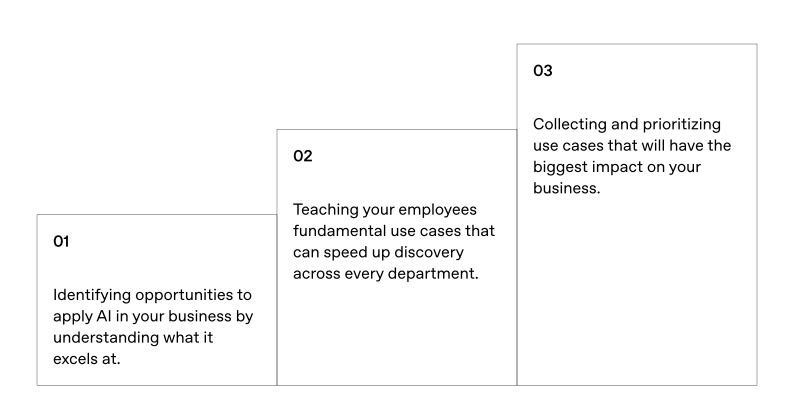
- 1. Identifying opportunities
- Examine your company’s processes and look for areas where artificial intelligence could be beneficial. Typical indicators include repetitive manual work, large amounts of data, slow processes, or decentralised information needed for decision-making.
- 2. Teaching basic use cases within the organisation
- When employees learn to recognise basic use cases, they can also suggest new ideas. This lowers the threshold for utilising artificial intelligence and accelerates innovation throughout the organisation.
- 3. Compiling and prioritising use cases
- Not all ideas can be implemented at once. Prioritisation helps to focus resources on those areas that will have the greatest impact. The simple Impact/Effort framework found in the guide works excellently for this – it guides you to start with projects that have a big impact but are still easy to try out.
Six basic use cases are good starting points for brainstorming AI solutions.
According to OpenAI, most of the benefits of artificial intelligence are concentrated in six core areas:
- Content production – reports, instructions and marketing materials
- Automation – automation of repetitive tasks and processes
- Research and analysis – summarising, structuring and observing data
- Programming tasks – code creation, testing and optimisation
- Data analysis – identifying trends and supporting decision-making
- Brainstorming and strategy work – developing new concepts and business scenarios
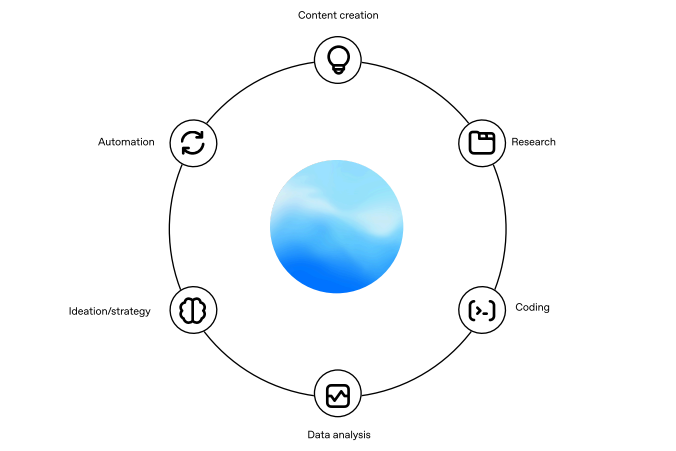
These six areas provide a good starting point for identifying the real value creation points of artificial intelligence in practice.
Practical examples from Hurja
At Hurja, we have demonstrated the possibilities of artificial intelligence through demos. They illustrate how AI solutions make processes more efficient – and, above all, make people’s work easier.
Examples of demos we have implemented:
- The order processor automates orders received by email into the ERP system, eliminating manual work and errors.
- The Ask the Document solution searches for answers directly from technical manuals or contracts in natural language.
- Speech recognition automatically converts meeting recordings and maintenance reports into text.
- An AI trainer brings interactivity to training materials and facilitates familiarisation.
- Trend analysis visually forecasts sales and resource requirements.
- Customer analysis helps sales teams understand the customer’s situation even before the first meeting.
For example, these solutions enable companies to reduce manual work, speed up decision-making and free up resources for higher-value tasks. Book a demo presentation.

Defining use cases in practice
Use cases can be described in text, table or visual form. Typically, two perspectives are distinguished:
- Business use case – describes why the function is important and what value it brings to the organisation.
- System use case – describes how the software technically implements the function in question.
These enable the company to describe both its strategic objective and its practical implementation.
Use case definition checklist
The table helps to ensure that each use case is defined with sufficient precision before implementation. Based on IBM’s Use case specification outline.
| Sub-area | Description and instructions | Questions to help you get started |
| Name of use case | Name the use case clearly. The name indicates the objective of the function or the visible end result. | What does the user do and what changes after successful completion? E.g. “Record maintenance work in the mobile application” or “Create an automatic order report”. |
| Brief description | Describe the role and purpose of the use case: why this function exists and what business need it serves. | Why is this function important? Whose problem does it solve? |
| The course of events | Present the main steps of the use case. Describe how the user and the system interact. Avoid details of the user interface and focus on what information is exchanged. | What does the user do first? What does the system respond? What information is transferred? |
| Basic travel | Describe the ideal situation, i.e. the basic process in which everything proceeds as planned. This is the case in which the system operates by default. | How does the process proceed when everything goes right? |
| Alternative costs | Describe any deviations or errors, such as incorrect input or missing information. | What happens if the user enters incorrect information? What if the connection is lost? |
| Special requirements | List non-functional requirements related to the use case, such as quality, security, performance, or regulatory factors. | Does the system have any specific performance or safety requirements? Do any laws or standards need to be taken into account? |
| Requirements | Describe the situation or conditions that must be in place before the use case can begin. | What needs to be done or ready before this process can begin? |
| After-conditions | Describe any states or results that the system may have after the end of the use case. | What changes in the system or what information is created when the process ends? |
| Extension points | Identify points where another use case relates to this one or continues from it. | Where does this use case link to other processes? E.g. “Recording a maintenance report” → “Starting invoicing”. |
Prioritisation, or where should you start?
When there are several use cases, it is advisable to organise them using an impact/effort matrix.
- Quick wins: big impact, little effort
- Long-term projects: high impact, but resource-intensive
- Easy to try: small impact, little effort
- To be avoided: small impact, significant effort
This ensures that the first AI projects deliver rapid, measurable results and lay the foundation for future projects.
How can we help?
The utilisation of artificial intelligence does not begin with technology, but with business needs. Carefully defined use cases help you identify areas where artificial intelligence can deliver real value. When ideas are carefully described, prioritised and tested, they form a sustainable basis for intelligent, scalable solutions.
At Hurja, we help companies identify the potential of artificial intelligence and put it into practice. For example, our AI Sprint workshop helps find the best ideas, and our AI Sandbox concretises the possibilities: we use demos to show how identified use cases can be implemented with artificial intelligence.
Book an AI Sandbox demo and see for yourself how artificial intelligence can give your business a real competitive edge.
Shall we get started?
"*" indicates required fields

 Hurja Solutions Oy acquired the software business of Klopal Oy