


The use of artificial intelligence in visual design
Artificial intelligence (AI)has permanently transformed the day-to-day work of visual design. Whereas just a few years ago AI tools were mere experiments and curiosities, they are now part of a designer’s daily work here at Hurja. AI does not replace a designer’s expertise, but it speeds up the work, opens up new possibilities and frees up time for more creative work.
In practice, this manifests itself in many ways in a designer’s day-to-day work. Notion’s AI assistant converts notes from client meetings into to-do lists and summaries. Adobe Firefly helps with image editing, background removal and brainstorming visual concepts. The AI features integrated into Figma, meanwhile, support the sketching of user interfaces, brainstorming text ideas and experimenting with different layout options.
In this blog post, we’ll look at how Hurja uses artificial intelligence in practice in visual design and UI/UX work.
- Adobe Firefly and Creative Cloud – AI in designers’ tools
- AI-based image generation and concept development
- Icons and graphics – AI speeds up the creation of custom content
- Brand imagery and illustrations created using artificial intelligence
- Figma Make and AI as tools for user interface design
- Artificial intelligence is developing at a rapid pace
Adobe Firefly and Creative Cloud – AI in designers’ tools
AdobeAI is a comprehensive suite that integrates artificial intelligence across all Adobe Creative Cloud applications. It powers a range of intelligent features in the background, such as automatic object selection, the Color Match tool and other features designed to speed up your workflow.
Adobe Firefly, on the other hand, is Adobe’s suite of generative AI tools, designed specifically for creative tasks such as generating images based on text prompts. The advantage of Firefly over other image generation tools is that it has been trained on licensed material, making it a safer option for commercial use from a copyright perspective.
In Photoshop, the Generative Fill feature allows you to complete and expand images, and seamlessly remove or replace objects using artificial intelligence. Extending and upscaling image boundaries is achieved with high quality, which is useful, for example, when the resolution of the source material is too low for the intended use.
In Illustrator, the Generative Recolor and Text to Vector features, in turn, significantly speed up the creation of vector graphics. Generative Recolor enables the color scheme to be changed quickly based on text input, for example to match a brand’s color palette, while Text to Vector creates vector graphics directly from text descriptions without the need for manual drawing. Thanks to these tools, designers can focus more on ideas and creative work, as manual labor is significantly reduced.
AI-based image generation and concept development
AI-powered image generation is useful both in the production of marketing materials and in the conceptualization of projects. There are currently several AI tools designed for image generation, but the best known and most popular are Adobe Firefly, Midjourney, DALL-E and Nano Banana. Here at Hurja, we make the most use of Adobe Firefly, which also allows you to select models from partners, and among these we use Nano Banana, among others.
In the concept development phase, artificial intelligence acts as an advanced image search tool: it can be used to find inspiration for the look and feel, quickly experiment with different styles, and establish the project’s visual direction at an early stage. AI-generated images can be used, for example, in mood boards to illustrate the project’s atmosphere to the client before the actual design work begins.
The image may seem a little odd in terms of its content, but the colors and atmosphere could be just right and really spark the imagination. The image quality of AI has improved significantly, although a keen eye may still spot minor inconsistencies in the details, so a designer’s assessment is still always necessary.

Icons and graphics – AI speeds up the creation of custom content
Icons, infographics and other graphics are a key part of UI/UX design, visual design and marketing materials. Most icons are still sourced from ready-made icon libraries, but artificial intelligence has opened up the possibility of quickly creating custom icons and graphics when ready-made libraries do not offer a suitable option.
Illustrator’s AI features, such as Text to Vector, also enable the creation of icons and vector graphics based on text input. Designers can quickly generate a range of options, select the best ones and refine them further to match the brand’s visual identity.


Artificial intelligence does not always produce graphics that are ready for immediate use, but it speeds up the process significantly by providing a good starting point that the designer can build on. This is particularly useful in situations where multiple icon variations are needed quickly, or a consistent set of graphics tailored to a brand’s identity.
Brand imagery and illustrations created using artificial intelligence
Artificial intelligence has also proved particularly useful in creating brand imagery and illustrations. Firefly can be used to generate images that align with an existing brand identity, or to create entirely new visual elements that complement the brand’s color palette and style.
Existing images can also be edited and standardized using artificial intelligence, which is useful, for example, when a company’s image library is fragmented or inconsistent.
When it comes to creating illustrations, artificial intelligence works best when the designer closely guides the process: selecting the best starting points, refining the results and integrating them into a broader visual whole. The end result is of higher quality than an image generated solely by AI, and it genuinely serves the client’s brand and objectives.

Figma Make and AI as tools for user interface design
Artificial intelligence has arrived in a big way and is here to stay, even in user interface design. Figma Make is Figma’s AI-powered ‘prompt-to-app’ tool, meaning it can be used to quickly create a functional UI prototype from an idea, a text prompt or an existing Figma design. Its strength lies in the fact that it can be given, for example, an existing component library or a user interface sketch as a reference, on the basis of which the AI refines a more polished version.
This is how AI generates a design that adheres to the client’s brand identity and existing design principles, rather than producing something completely generic. In Figma Make, you can also choose which AI model to use as the basis, such as Claude or Gemini.
Achieving a good end result requires an active approach from the designer. The designer guides the AI throughout the process: refining text inputs, selecting the best directions and iterating the results. AI particularly speeds up the creation of variations and the conceptualization of new perspectives, allowing the designer to focus on refining the user experience and the overall design.
Ultimately, however, it is always the person in charge who is responsible for the overall picture and for ensuring that the plan takes into account any accessibility requirements, user needs and business objectives.
Artificial intelligence is developing at a rapid pace
Artificial intelligence has advanced at a rapid pace in the field of visual design, and there are no signs of it slowing down. Tools that seemed like experiments just a few years ago are now part of a professional designer’s daily routine. At the same time, the rapid development of AI continues to raise legitimate questions about copyright and the future of creative work. The rules of the game are currently being clarified, particularly in the EU, where providers of AI models are being required to demonstrate greater transparency than before, for example regarding training data and the observance of copyright.
In a designer’s day-to-day work, this means, above all, responsible use: AI must not be used to imitate copyrighted works, well-known artists or brands, nor should material be fed into the tool for which the user does not hold the rights. AI generates an endless array of options, but it is the designer’s expertise that determines what is usable, what fits the brand’s identity and what serves the client’s objectives.
At its best, artificial intelligence serves to support the drafting, brainstorming and generation of options, but the final creative responsibility and judgment remain with the human designer. The combination of the speed of artificial intelligence and the designer’s expertise produces the best result.
At Hurja, we’re here to help with your company’s visual needs, whether you’re using AI or not, as well as with software development. So, if you’re looking for a partner to develop digital services who has both technical and visual expertise, get in touch!
Shall we get started?
"*" indicates required fields
You might also like these articles

6 winning use cases for AI – how to find where it really pays off
Read more

User stories as a tool in app design using artificial intelligence
Read more
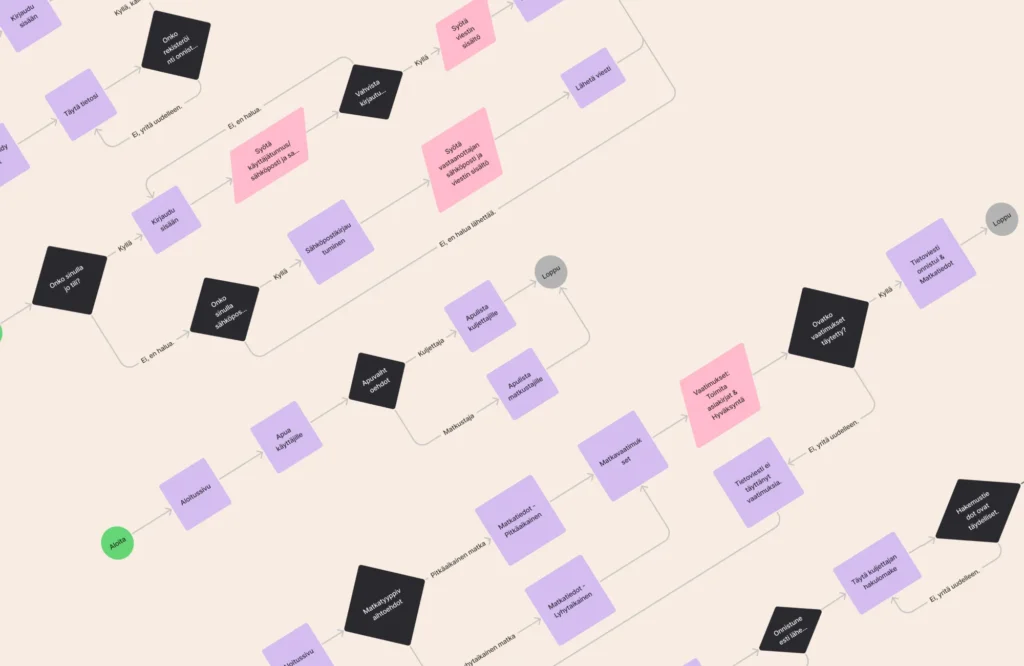
User journeys and AI – how to build a user-centric and intelligent service experience
Read more

Generative artificial intelligence (GenAI) in business
Read more
 RAG AI chatbot for businesses