


Dynamics 365 Guides – guidance through mixed reality
Dynamics 365 Guides is a cloud-based mixed reality application for HoloLens AR headsets, part of Microsoft’s Dynamics 365 product family. As its name suggests, Dynamics 365 Guides is a versatile guidance application that offers numerous benefits for both the manufacturing industry and educational settings.
With Dynamics 365 Guides, various instructions and guided tours can be presented interactively exactly where they are needed. Instructions can be presented visually, for example on an assembly line or in a training simulation. Instructions projected onto HoloLens headsets can include images, videos, 3D models and holograms. Interactive guidance, delivered in exactly the right place at the right time, facilitates learning and the absorption of instructions, which boosts work efficiency and also reduces the number of errors.
Copilot, available in Dynamics 365 Guides, transforms the real world into input for generative AI, providing support for front-line workers in industry. Staff can interact with Copilot using natural language and gestures, receiving the information they need in real time via speech and holograms. Mixed reality, integrated with AI, creates a human-centered user interface that streamlines practical work processes. Guides’ Copilot offers significant opportunities for companies seeking to increase the efficiency and productivity of their operations.
Dynamics 365 Guides and Mixed Reality (MR)
Why use the Dynamics 365 Guides app?
6 benefits of the Dynamics 365 Guides app

What is Dynamics 365 Guides suitable for?
Example use cases for the work stages of an assembly line
- Step-by-step guidance on the work stages
- Review of text-based instructions
- The option to add illustrative images and videos
- Visually striking arrows and graphics guide the user
- Potential to utilize artificial intelligence
Examples of use in teaching
- Viewing 3D models and holograms
- Helps to illustrate subjects such as biology, physics or engineering
- A wide variety of 3D models and holograms
- You can also import your own 3D models into the system
- Potential to utilize artificial intelligence
You can also read user stories about Dynamics 365 Guides on the Microsoft website.
Content in the Dynamics 365 Guides service
Dynamics 365 Guides consists of an app for use with HoloLens and a desktop app for creating content. The HoloLens app features a guidance pane that displays the instructions and content (images, videos, links) set up in the desktop app. The desktop application allows you to add your own 3D objects.
System requirements for the Dynamics 365 Guides app
- Setting up the production environment must be carried out using a Microsoft account with admin rights
- System requirements: PC and HoloLens 2
- The ability to link Microsoft Power apps
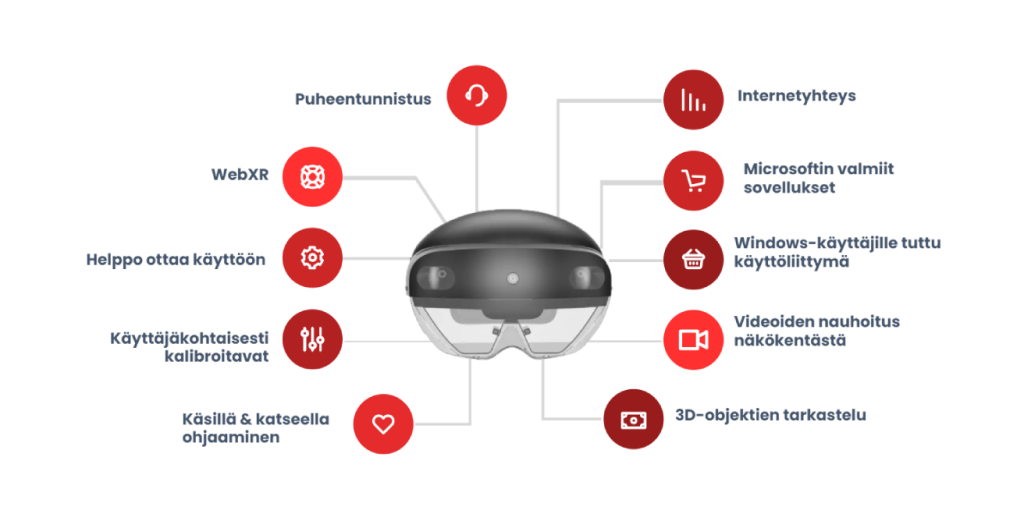
Features of the HoloLens 2 headset
- Hand and eye tracking
- 3D objects, menus and media are seamlessly integrated into the right environment, and are mainly operated by touching or pointing at content and menus
- A wide variety of apps for HoloLens are available via the Windows App Store
- Microsoft has a number of high-quality products of its own: Dynamics 365 Guides, Remote Assist, Mesh, etc.
- It is possible to use WebXR, meaning the software can be accessed via a web browser.
- A general requirement for use is the ability to use the upper body, hands and fingers. It is also possible to create customised implementations based, for example, solely on head movements or speech.
Training and implementation
We’ll guide you on how to use and make the most of the platform in line with your needs. We will set up a production environment on your behalf that enables the use of the Dynamics 365 Guides system, and we will assist you in producing your initial content and adding it to the system. The user-friendliness of Guides means that your organisation will be able to use the application independently in future, without being tied to a single provider.
We’ll therefore train you in the basics of the Dynamics 365 Guides system and help you develop creative solutions yourselves. We’ll of course continue to support you as needed and help you find the best possible solutions!
- Installation in a production environment
- We will set up the Dynamics 365 Guides production environment so that it is ready for use
- HoloLens 2 training
- We provide training on how to use Hololens 2 headsets and offer guidance on how to get the most out of them
- Creating content
- We’ll help you create your initial content and upload it to the system
- Dynamics 365 Guides training
- We provide training on how to use the Dynamics 365 Guides system and offer guidance on solution development
- Customer service and further development
- We will continue to help develop innovative solutions and offer content development services
Extended reality (XR) solutions are no longer the stuff of science fiction
Various extended reality (XR) solutions are now available to everyone; they are not just science fiction set in the future. Nor are the prices sky-high. For example, HoloLens costs between €3,000 and €4,500, and a monthly license for the Dynamics 365 Guides app is around €56 per user.
By making use of new digital solutions, you can gain a genuine competitive advantage. At present, very few organisations are making use of the potential offered by augmented reality glasses, for example, so there are excellent market opportunities for pioneers! So please don’t hesitate to ask if you’d like to know more about the various XR options, such as WebAR, AR apps for mobile devices, or more comprehensive solutions designed for AR glasses, such as HoloLens or Dynamics 365 Guides!
If you’re looking for a solution that’s guaranteed to set you apart from the competition, find out more about Hurja’s augmented reality services and get in touch!
Ready to get started?
"*" indicates required fields




 Hybrid working, remote working or on-site working