


An easy-to-maintain website – WordPress Gutenberg
WordPress Gutenberg makes a website administrator’s job easier. At Hurja, we ensure that your company gets a website that meets your needs and looks great, and we want you to find maintaining your site both rewarding and easy. We now use the WordPress Gutenberg editor by default in all our website projects, as we have seen its benefits in practice. WordPress Gutenberg makes the site administrator’s job easier and provides developers with versatile tools suitable for customizing content management.
At Hurja, we make sure you get a stylish website for your business that meets your needs, and we want you to find maintaining your site both rewarding and easy. We currently use the WordPress Gutenberg editor by default in all our website projects, as we have seen its benefits in practice. WordPress Gutenberg makes the site administrator’s job easier and provides developers with versatile tools suitable for customizing content management.
WordPress websites and Gutenberg
In 2018, the WordPress platform launched the Gutenberg editor, developed to meet the needs of the modern web. WordPress Gutenberg introduced many new practices that have had an impact on the work of site administrators and developers. The most noticeable change was that administrators can now build content in the editor using either pre-built blocks or blocks customized by developers.
Aren’t you familiar with Gutenberg? You can try out Gutenberg on WordPress’s own website. The demo page mimics the Gutenberg editor interface, where the content of a single page is edited using blocks.
WordPress Gutenberg is ideal for content managers
You may remember WordPress’s classic editor? If not, do have a look at the classic editor. The classic editor’s user interface resembles that of a word processor, and different content types (e.g. tables) are edited in their own separate views.
An easy-to-use interface and clear management screens
From an administrator’s perspective, the most noticeable difference between WordPress’s classic editor and Gutenberg is the user interface and its features. Managing website content is easier with Gutenberg, as the user interface can be customized with views and tools tailored to individual needs.
In Gutenberg, each page is edited in its own WYSIWYG-style view (What You See Is What You Get). In Gutenberg, different content types, such as tables, columns or image galleries, are therefore not edited in separate management views, as was the case with the classic editor. Instead of management views, content types are accessed via the blocks menu.
The content of a WordPress site is made up of blocks
Blocks are ready-made, ready-to-use and fully finished modules into whose open fields the administrator enters the desired content (see Figure 1). Content assembled from various blocks, in turn, forms the view of an individual web page, such as the latest blog post or a page presenting the company’s services.
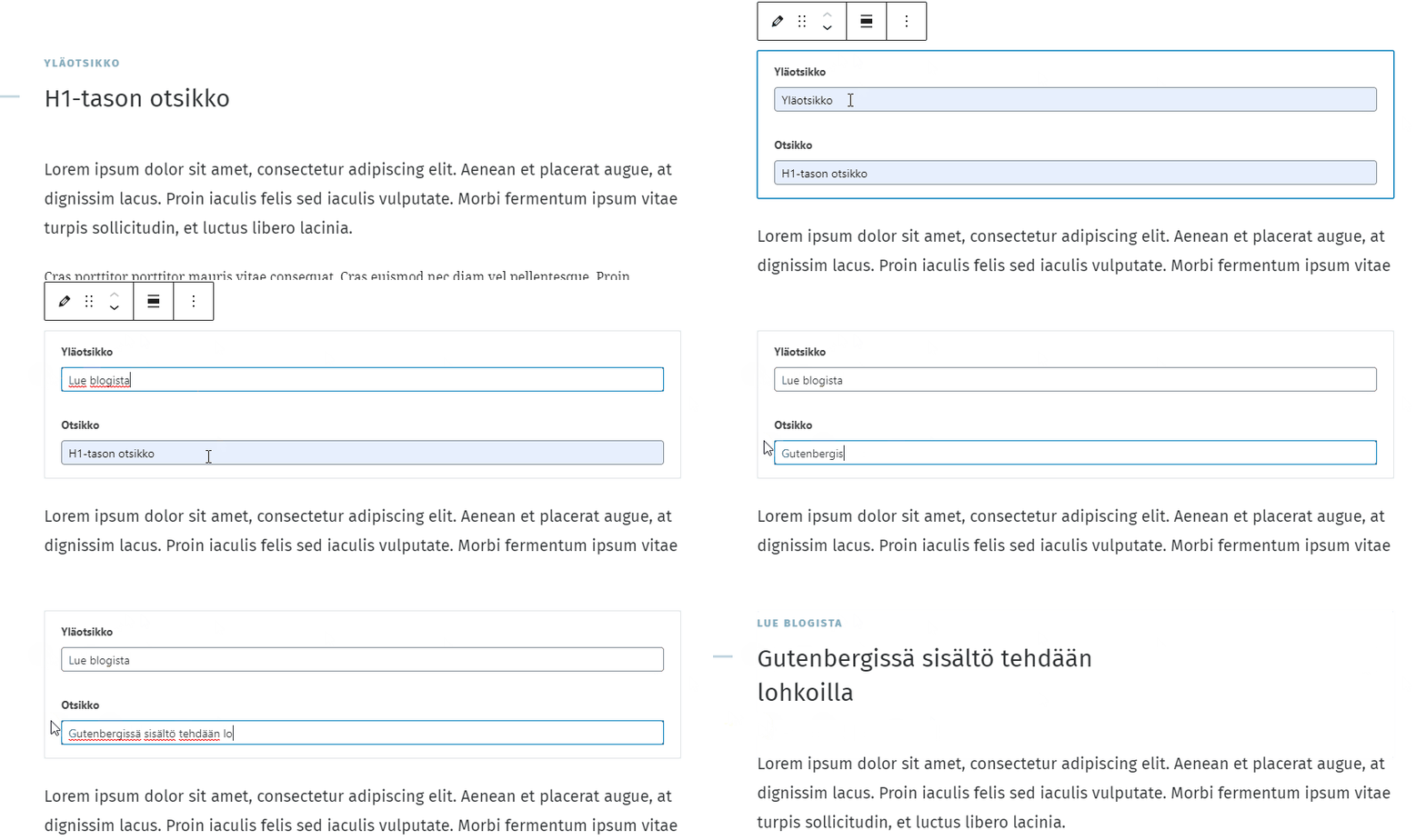
WooCommerce, which is familiar from online shops, for example, is also compatible with blocks. Using WordPress Gutenberg, you can create sections such as “Latest Products” for static pages or news posts, with the data retrieved from the database. By clicking on a product, a visitor can add it to their shopping cartor proceed directly to the online shop’s checkout.
So, blocks make the administrator’s job easier:
- Customizable content blocks and the block menu offer a wealth of options for editing content: it’s easy to insert images, videos, links or other rich media blocks within the text.
- Creating content is straightforward, as the administrator sees an individual page in the editor in exactly the same way as the end user (see Figure 2).
- Blocks can be used to create distinct content areas.
- Blocks can be duplicated and deleted without affecting the overall look and feel of the website.
As the webmaster mainly works with blocks and ready-made document templates, maintaining the site is safer than before. For example, the webmaster can no longer access the HTML code so easily. Word on the developer’s grapevine has it that, back in the day, an administrator tinkering with HTML would sometimes inadvertently delete a snippet of essential code (e.g. an HTML closing tag) and thereby caused the entire website to stop working.
So where can you get these blocks that bring content to life, are unique and secure?
Gutenberg from a developer’s perspective
The role of a WordPress developer using the Gutenberg editor is to code a theme in line with the design brief and to build a selection of blocks tailored to the client’s needs that are consistent with the theme. Gutenberg comes with a number of basic themes and blocks, but the selection is limited and is mainly suitable for website projects with a more modest budget.
WordPress theme
The starting point is to select or create a layout theme that supports the use of the required blocks and can be adapted to the layout plan. In addition to visual specifications, the layout theme includes guidelines for, for example, document types. Different document types may include, for example, the home page, the product range page, articles and the contact details page, each of which is handled as a separate entity within the editor.
Customizing blocks
Once the theme has been coded, the next step is to build the appropriate blocks. Blocks define the content of the website’s various views, so the developer must customize the agreed block types to suit the client’s needs. Development work with customized blocks often starts with a blank screen, and it is only as the work progresses that the content begins to look the same both in the developer’s editor and on the site visible to the end user (see Figure 2).
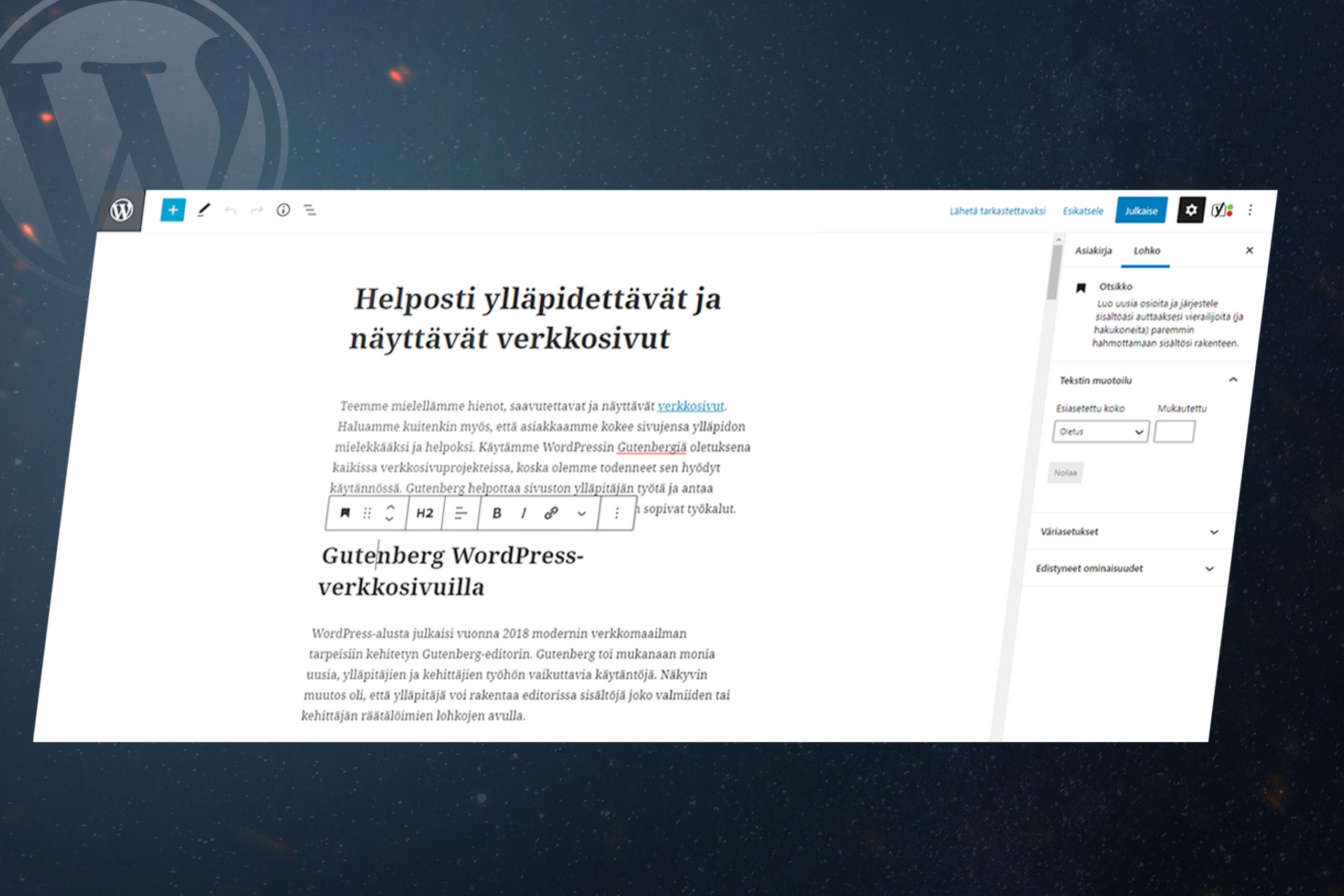
The end result of the work is a design theme that adheres to the client’s design brief, along with a suitable, user-friendly selection of blocks that supports the website’s various content requirements. The blocks, in turn, include not only the layout but also all the detailed specifications relating to their use.
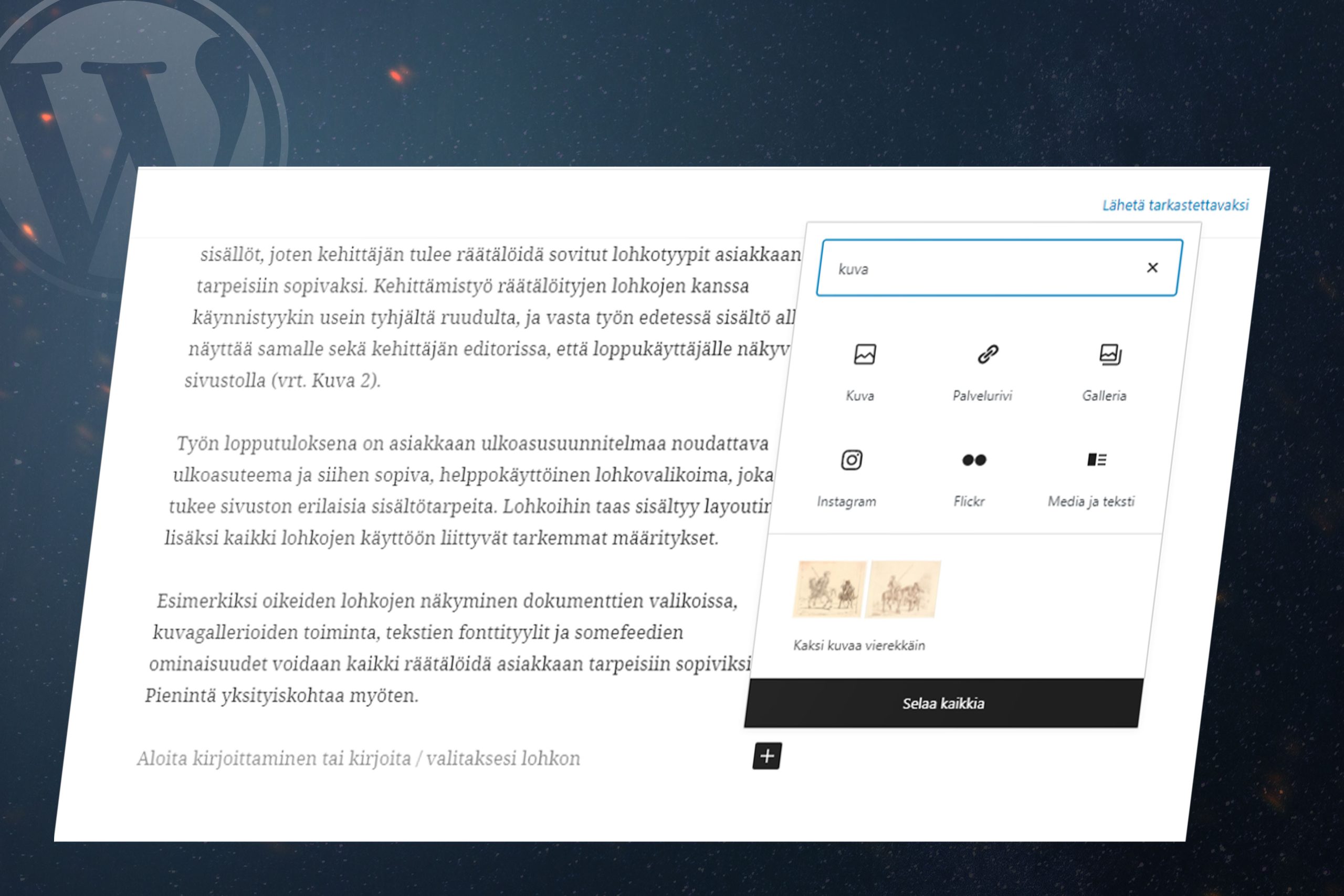
For example, the display of the correct sections in document menus (see Figure 3), the functionality of image galleries, text font styles and social media feed features can all be customized to suit the client’s needs. Down to the very smallest detail.
Personalized management view
One of the advantages of the WordPress Gutenberg editor is the ability to customize the content and style of the admin dashboard. In addition to coding the theme and blocks, the developer’s task is also to customize the Gutenberg editor to suit the client’s needs.
Through customization, the various views of the website, as well as content editing and maintenance, can be made exactly as logical and user-friendly as the administrator wishes.
How do you set up Gutenberg on a WordPress site?
When setting out to develop a completely new website, WordPress Gutenberg is a good option. It is often suitable for websites built using the classic editor as well, as Gutenberg’s developers have aimed for the widest possible compatibility between the two editors. WordPress has endeavored to make updating to Gutenberg straightforward – just a couple of clicks and the new editor is up and running.
However, compatibility between the Classic Editor and Gutenberg is not entirely straightforward. Particularly when using plugins or custom implementations, you need to be sure how an editor update will affect the site’s appearance and functionality. To ensure that your site remains intact and functions correctly with Gutenberg, it is important to carefully review any potential issues before proceeding with the update.
WordPress websites tailored to your business needs
The default theme for a WordPress site and Gutenberg’s ready-made content blocks will get you a long way, but they won’t cover every eventuality without some customization. As websites often need to present diverse and personalized content, web projects require customization, at least in terms of the theme and content blocks.
The WordPress Gutenberg editor provides us developers with faster and better tools for developing our clients’ websites, brings flexibility to our solutions and enables us to deliver results that meet your requirements. So, if you need a new website for your business or your current site needs updating, please get in touch with us. Let’s work together to create a modern website that will also meet your future needs!
Shall we get started?
"*" indicates required fields




 Test-driven development delivers quality and stability